
AI EngineeringMcp
MCP Server in Spring AI
What is MCP Server?
- An MCP Server is a program that provides contextual data and executable capabilities to AI applications through MCP clients
- It exposes tools, resources, and prompts that can be dynamically discovered and used by an AI system
- It can run locally or remotely and serves as a dedicated context provider for AI-driven workflows
MCP Architecture Overview
- MCP Host (AI Application) sits at the top and coordinates all MCP clients
- Each MCP Client maintains a dedicated connection to exactly one MCP Server
- MCP Server A and MCP Server B represent local servers (e.g., Filesystem, Database) connected via separate clients
- MCP Server C represents a remote server (e.g., Sentry) and can be connected by multiple clients at the same time
- The MCP Host can talk to many servers in parallel by creating multiple MCP clients, one per connection
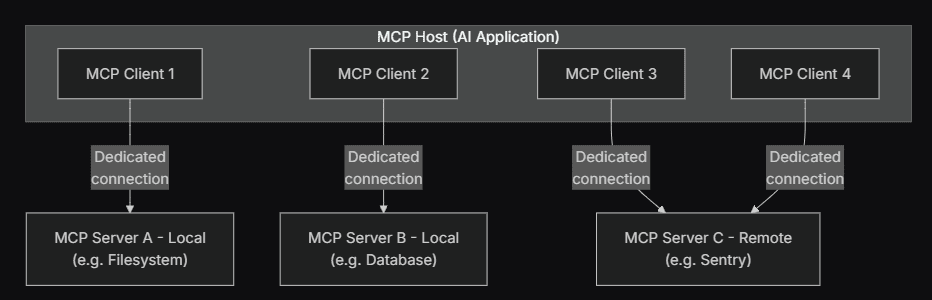
- Reference from: MCP official docs
Why do we need MCP Server?
- It separates context and tool logic from the AI application, improving modularity and scalability
- It enables AI systems to safely interact with external systems like files, databases, and APIs
- It allows multiple MCP clients to connect to different MCP servers simultaneously for richer context
How to implement?
- Step 1: Create two Spring Boot applications, one for MCP Client and one for MCP Server
// Client project package
package com.telusko.mcp_demo;

// Server project package
package com.telusko.mcpserver;- Step 2: In the MCP Server project, create a DateTimeTool and expose methods using @Tool so MCP clients can invoke it
import org.springframework.ai.tool.annotation.Tool;
import org.springframework.stereotype.Component;

import java.time.ZoneId;
import java.time.ZonedDateTime;

@Component
public class DateTimeTool {

    @Tool(description = "Get Current date and time for user's timezone")
    public String getCurrentDateAndTime(){
        System.out.println("in local timezone");
        return ZonedDateTime.now().toString();
    }

    @Tool(description = "Get Current date and time for user's timezone")
    public String getCurrentDateAndTimeTimeZoned(String timezone){
        System.out.println("in specified timezone");
        return ZonedDateTime.now(ZoneId.of(timezone)).toString();
    }
}- Step 3: In the MCP Server project, create a NewsTool and expose it using @Tool so it becomes available as a callable tool
package com.telusko.mcpserver;

import org.springframework.ai.tool.annotation.Tool;
import org.springframework.stereotype.Component;
import org.springframework.web.client.RestTemplate;

@Component
public class NewsTool {

    private RestTemplate restTemplate = new RestTemplate();

    @Tool(description = "Get current news haedlines for specific topic")
    public String getNewsHeadlines(String topic){

        String apiKey = "<YOUR API KEY>";
        String url = "https://newsapi.org/v2/everything?q=" + topic + "&apiKey=" + apiKey;

        String result = restTemplate.getForObject(url, String.class);
        System.out.println(result);

        return result;
//        return "News Headlines for topic " + topic;
    }
}- Step 4: In the MCP Server project, register all tools as ToolCallbacks using a configuration class so the server can publish them
package com.telusko.mcpserver;

import org.springframework.ai.support.ToolCallbacks;
import org.springframework.ai.tool.ToolCallback;
import org.springframework.context.annotation.Bean;
import org.springframework.context.annotation.Configuration;

import java.util.List;

@Configuration
public class McpServerConfig {

    @Bean
    public List<ToolCallback> toolCallbacks(DateTimeTool dateTimeTool, NewsTool newsTool){
        return List.of(ToolCallbacks.from(dateTimeTool, newsTool));
    }
}- Step 5: In the MCP Server project, configure the server port so the MCP Client can connect to it locally
spring.application.name=mcpServer
server.port=8282- Step 6: In the MCP Client project, create a controller that uses ChatClient and enables tool calling via ToolCallbackProvider
package com.telusko.mcp_demo;

import org.springframework.ai.chat.client.ChatClient;
import org.springframework.ai.tool.ToolCallbackProvider;
import org.springframework.web.bind.annotation.GetMapping;
import org.springframework.web.bind.annotation.RequestMapping;
import org.springframework.web.bind.annotation.RequestParam;
import org.springframework.web.bind.annotation.RestController;

@RestController
@RequestMapping("/api")
public class MCPController {

    private ChatClient chatClient;

    public MCPController(ChatClient.Builder chatClientBuilder, ToolCallbackProvider toolCallbackProvider) {
        this.chatClient = chatClientBuilder
                .defaultToolCallbacks(toolCallbackProvider)
                .build();
    }

    @GetMapping("/chat")
    public String getAnswer(@RequestParam String question) {
        return chatClient.prompt(question).call().content();
    }
}- Step 7: In the MCP Client project, configure OpenAI API key and connect to MCP Server using SSE connection URL
spring.application.name=mcp_demo
spring.ai.openai.api-key=<your-api-key>
spring.ai.mcp.client.sse.connections.spring-ai-mcp.url=http://localhost:8282- Step 8: Use SSE-based connection for local communication where MCP Client subscribes to server tool publishing over HTTP streaming
spring.ai.mcp.client.sse.connections.spring-ai-mcp.url=http://localhost:8282Key Points to Know
- Stdio transport is used for local MCP servers and enables fast process-level communication
- Streamable HTTP transport is used for remote MCP servers and supports secure HTTP-based access
- SSE enables one-way real-time streaming from server to client over HTTP
- Streamable HTTP supports bidirectional request-response with optional streaming
- RMI allows method invocation across JVM boundaries with tight coupling
- RPC enables language-agnostic remote function execution using structured protocols
Last updated on