
AI EngineeringLangchain ai agents
AI Agents in Langchain
What Are AI Agents?
Definition
- An AI Agent is an LLM-powered system designed to achieve a goal, not just return a single answer.
- It combines:
- A Language Model (LLM)
- Tools (APIs, search, utilities)
- The agent works in a loop:
- Decide the next step
- Use a tool if required
- Read the tool output
- Continue until the final answer is ready
- Context is maintained across steps, enabling multi-step problem solving.
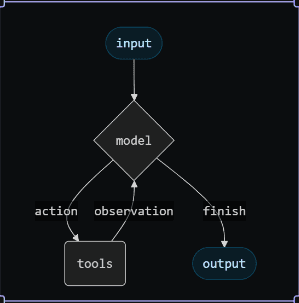
ReAct Concept (Reasoning + Acting)
- ReAct is a design pattern used by agents.
- The agent cycles through:
- Thought: Analyze what to do next
- Action: Invoke a tool
- Observation: Read and understand tool output
- This approach reduces hallucinations by relying on real tool results instead of guesses.
When Are Agents Helpful?
Suitable Scenarios
- When a question requires more than one step to answer.
- When external or real-time data is needed.
- When the sequence of steps is not fixed and must be decided dynamically.
How to Implement an Agent?
Step 1: Import required modules
- Import tool decorator, datetime utility, env loader, LLM, messages, search tool, agent builder, and prompt template.
from langchain_core.tools import tool
from datetime import datetime
from dotenv import load_dotenv
from langchain_openai import ChatOpenAI
from langchain_core.messages import HumanMessage, ToolMessage
from langchain_community.tools import DuckDuckGoSearchRun
# from langchain_classic.agents import create_react_agent, AgentExecutor
from langchain.agents import create_agent
from langchain_core.prompts import PromptTemplate
Step 2: Load environment variables (API keys)
- Loads variables from .env.
load_dotenv()Step 3: Define and create tools (custom + external)
- Custom tool: get_current_date_time created using @tool
- External tool: DuckDuckGoSearchRun for web search
@tool("get_current_date_time")
def get_current_date_time() -> str:
    """Get the current date and time."""
    return datetime.now().strftime("%Y-%m-%d %H:%M:%S")

search_tool = DuckDuckGoSearchRun()
Step 4: Create the LLM + register tools + define ReAct prompt
- Create the LLM using ChatOpenAI(model="gpt-4o")
- Put tools into a list and bind them to the LLM
- Build a ReAct-style prompt template
llm = ChatOpenAI(model="gpt-4o")

tools = [get_current_date_time, search_tool]

llm_with_tools = llm.bind_tools(tools)

prompt = PromptTemplate.from_template("""
You are an AI assistant that can use tools.

TOOLS:
{tools}

IMPORTANT:
- Always follow the format exactly.
- Always end with: Final Answer: ...

FORMAT:

Question: {input}
Thought: think about what to do
Action: one of [{tool_names}]
Action Input: the input to the action
Observation: the result of the action
... (repeat Thought/Action/Action Input/Observation if needed)
Thought: I now know the final answer
Final Answer: the final answer

Begin!

Question: {input}
{agent_scratchpad}
""")
Step 5: Create agent and run queries
- Create agent with tools
- Define chat() to invoke the agent using messages
- Call chat() and print response
# agent = create_react_agent(llm, tools, prompt)
agent = create_agent(model=llm, tools=tools)

# agent_excutor = AgentExecutor(agent=agent, tools=tools, verbose=True)

def chat(query: str) -> str:
    # result = agent_excutor.invoke({"input": query})
    result = agent.invoke({"messages": [{"role": "user", "content": query}]})
    return result

response = chat("Current time in the country where messi visited in Dec 2025 ")
print(response)- Expected internal flow:
- Agent uses DuckDuckGoSearchRun to find the country Messi visited in Dec 2025
- It uses get_current_date_time to fetch current date-time
- It combines both into the final response
Last updated on