
AI EngineeringLangchain ai agents
Parallel Workflow in LangGraph
What is Parallel Workflow?
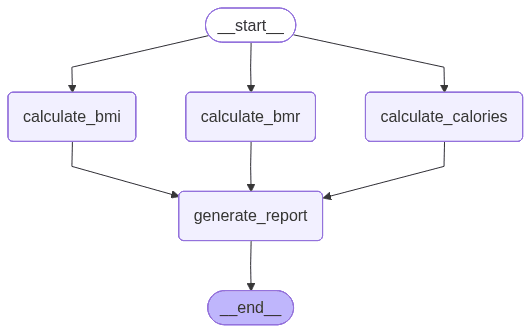
- Multiple nodes start from the same START point and run as separate branches.
- Each branch works on the same shared State and writes its own output keys.
- Branch results can converge into a single node
(fan-in)like generate_report. - Useful when independent tasks
(BMI, BMR, Calories)can be computed separately and merged later.
Parallel Health Report Workflow
- Workflow Goal:
- Calculate BMI, BMR, and Daily Calories in parallel.
- Collect their feedback into state.
- Generate one final combined overall health report.
Implementation steps for Health Report Parallel Workflow
Step 1: Imports and Environment Setup
from langgraph.graph import StateGraph, START, END
from langchain_openai import ChatOpenAI
from typing import TypedDict, Annotated
from dotenv import load_dotenv
from pydantic import BaseModel, Field
import operator
Step 2: Initialize the LLM
load_dotenv()
model = ChatOpenAI(model="gpt-4o")
Step 3: Define Structured Output Schema (HealthSchema)
class HealthSchema(BaseModel):
    metric_name: str = Field(description = "Name of the health metric")
    value: float = Field(description = "Value of the health metric")
    explanation: str = Field(description = "short Explanation of the health metric")

structured_model = model.with_structured_output(HealthSchema)
Step 4: Define Shared State (HealthState)
class HealthState(TypedDict):
    age: int
    weight: float
    height: float
    activity_level: str

    bmi_feedback: str
    bmr_feedback: str
    calories_feedback: str
    overall_report: str
    individual_values: Annotated[list[float], operator.add]
Step 5: Node 1 — calculate_bmi
def calculate_bmi(state: HealthState):

    weight = state['weight']
    height = state['height'] / 100  # convert cm to meters

    prompt = f"Calculate the BMI for a person with weight {weight} kg and height {height*100} cm. Provide feedback on the BMI value."

    feedback = structured_model.invoke(prompt)

    return {'bmi_feedback': feedback.explanation, 'individual_values': [feedback.value]}
Step 6: Node 2 — calculate_bmr
def calculate_bmr(state: HealthState):
    age = state['age']
    weight = state['weight']
    height = state['height']
    activity_level = state['activity_level']

    prompt = f"Calculate the BMR for a person aged {age} years, weighing {weight} kg, with height {height} cm and activity level {activity_level}. Provide feedback on the BMR value."

    feedback = structured_model.invoke(prompt)

    return {'bmr_feedback': feedback.explanation, 'individual_values': [feedback.value]}
Step 7: Node 3 — calculate_calories
def calculate_calories(state: HealthState):

    weight = state['weight']
    height = state['height']
    age = state['age']
    activity_level = state['activity_level']

    prompt = f"Calculate the daily calorie needs for a person aged {age} years, weighing {weight} kg, with height {height} cm and activity level {activity_level}. Provide feedback on the calorie needs."
    feedback = structured_model.invoke(prompt)
    return {'calories_feedback': feedback.explanation, 'individual_values': [feedback.value]}
Step 8: Fan-in Node — generate_report
def generate_report(state: HealthState):

    bmi_feedback = state['bmi_feedback']
    bmr_feedback = state['bmr_feedback']
    calories_feedback = state['calories_feedback']

    prompt = f"Generate a comprehensive health report based on the following feedbacks:\nBMI Feedback: {bmi_feedback}\nBMR Feedback: {bmr_feedback}\nCalories Feedback: {calories_feedback}"

    report = model.invoke(prompt).content

    return {'overall_report': report}
Step 9: Graph Construction as Parallel Workflow
graph = StateGraph(HealthState)
graph.add_node('calculate_bmi', calculate_bmi)
graph.add_node('calculate_bmr', calculate_bmr)
graph.add_node('calculate_calories', calculate_calories)
graph.add_node('generate_report', generate_report)

graph.add_edge(START, 'calculate_bmi')
graph.add_edge(START, 'calculate_bmr')
graph.add_edge(START, 'calculate_calories')

graph.add_edge('calculate_bmi', 'generate_report')
graph.add_edge('calculate_bmr', 'generate_report')
graph.add_edge('calculate_calories', 'generate_report')

graph.add_edge('generate_report', END)

workflow = graph.compile()

initial_state = {'age': 35, 'weight': 83, 'height': 183, 'activity_level': 'moderate'}

final_state = workflow.invoke(initial_state)

print(final_state)
Visualizing the Workflow Graph
png = workflow.get_graph().draw_mermaid_png()
with open('health_report.png', 'wb') as f:
    f.write(png)
Parallel Workflow Diagram
Last updated on